Run a Slurm Cluster on Your Laptop with Vantage Compute
By Bryan Ward · Date Published:
7 min read

Key takeaways
- Three steps: create an on-premises cloud account, deploy Slurm with one v8x command, and run a job from the Vantage Compute dashboard.
- The cluster is a single virtual machine on your own Linux host. You need hardware virtualization, 2 CPUs, 4 GB of memory, 10 GB of disk and uv.
- This is a small version of what we do for enterprise teams: Slurm on hardware they already own, on infrastructure they control.
- The Vantage agents install with the Vantage Agents Ansible role by default. Add --terraform to install them with the Terraform modules instead. Both are public on GitHub.
Vantage Compute takes you from a Linux host to a running Slurm job in a few minutes. This post walks through the same journey as the video above, one step at a time: create an on-premises cloud account, deploy a single node Slurm cluster in a virtual machine on your own machine, and run a job on it.
What you need
- A Linux host on x86-64 with hardware virtualization (
/dev/kvm) - Room for a virtual machine: 2 CPUs, 4 GB of memory and 10 GB of disk
- Outbound HTTPS to Vantage Compute
uv, which provides theuvxcommand used below
If QEMU is missing, v8x prints the commands to install it. It never runs sudo itself.
Step 1: Create an on-premises cloud account
In the Vantage dashboard, open Settings, then Cloud Accounts, and create a cloud account. Choose On-Premises, name it demo-on-prem and create it. The account stands for the site where your infrastructure lives.
Step 2: Install uv
Skip this step if uv --version already works. Otherwise install it:
curl -LsSf https://astral.sh/uv/install.sh | sh
Open a new terminal, or source your shell profile, so uv and uvx are on your PATH.
Step 3: Log in with v8x
uvx v8x login
The command prints a link. Open it in a browser and sign in, and the terminal picks up the session.
Step 4: Deploy Slurm with one command
Name the cluster, point it at the cloud account and choose the slurm-single-qemu app:
uvx v8x cluster create demo-cluster --cloud-account demo-on-prem --app slurm-single-qemu
What happens in the background
That one command does all of this for you:
- Checks the host.
v8xlooks for QEMU,qemu-img,xorriso, UEFI firmware and a/dev/kvmyour user can open. If something is missing, it prints thesudocommands to install it from your distribution's own packages and waits while you run them in another terminal. - Registers the cluster in Vantage. It creates the
demo-clusterrecord under yourdemo-on-premcloud account, along with the credentials the cluster's agents use to talk to Vantage. - Downloads the Slurm image. The first run downloads a ready-made image, checks its size and checksum, and keeps it in
~/.v8x/slurm-single-qemu/images/. Later deployments of the same image reuse it. - Boots the virtual machine. It creates a disk from the image and starts a virtual machine under QEMU and KVM, with 2 vCPUs, 4 GB of memory and a 10 GB disk, running Rocky Linux 10. The disk, console log and settings live in
~/.v8x/slurm-single-qemu/vms/slurm-qemu-demo-cluster/. - Configures Slurm. At first boot, cloud-init sets up the whole cluster in the one virtual machine: the Slurm controller, the compute node, the accounting database, the REST API and the LDAP login.
- Installs the Vantage agents. The Vantage Ansible roles install the agents that connect the cluster to Vantage. The last of them,
cluster-presence-agent, reports in every 60 seconds, and that is what marks the cluster as connected.
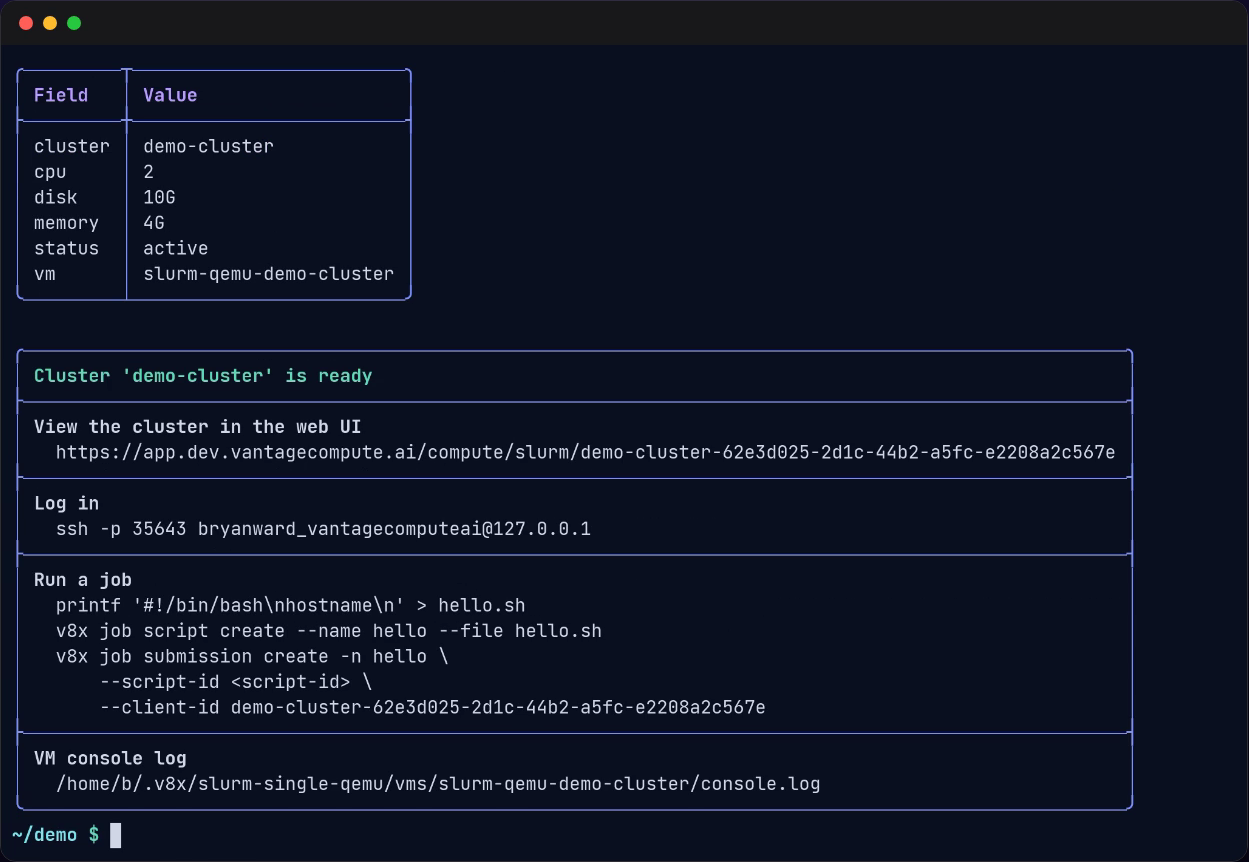
The command returns once cloud-init reports that it has finished. The first run takes a few minutes. When it is done, v8x prints the cluster's details and what to do next: the link to the cluster in the web UI, the ssh command to log in to the virtual machine, and the path of its console log.
Alternative: install the agents with Terraform
The agents install with the Vantage Agents Ansible role by default. If your team runs Terraform, add --terraform and v8x installs them with the Vantage Terraform modules instead. You can also size the virtual machine with --options:
uvx v8x cluster create demo-cluster \
  --cloud-account demo-on-prem \
  --app slurm-single-qemu \
  --terraform \
  --options cpu=4,mem=8GB,disk=40
With --terraform, the virtual machine boots without the agents. Once cloud-init has finished, v8x applies the modules from your host over the virtual machine's forwarded SSH port. You need terraform 1.4 or newer on the host. Every --options key is optional; see the QEMU VM options for the full list.
Step 5: Check the cluster in Vantage
Open the link v8x printed, or go to Clusters, then Slurm, in the Vantage dashboard. demo-cluster shows as Connected, on premise, once its agent has checked in.
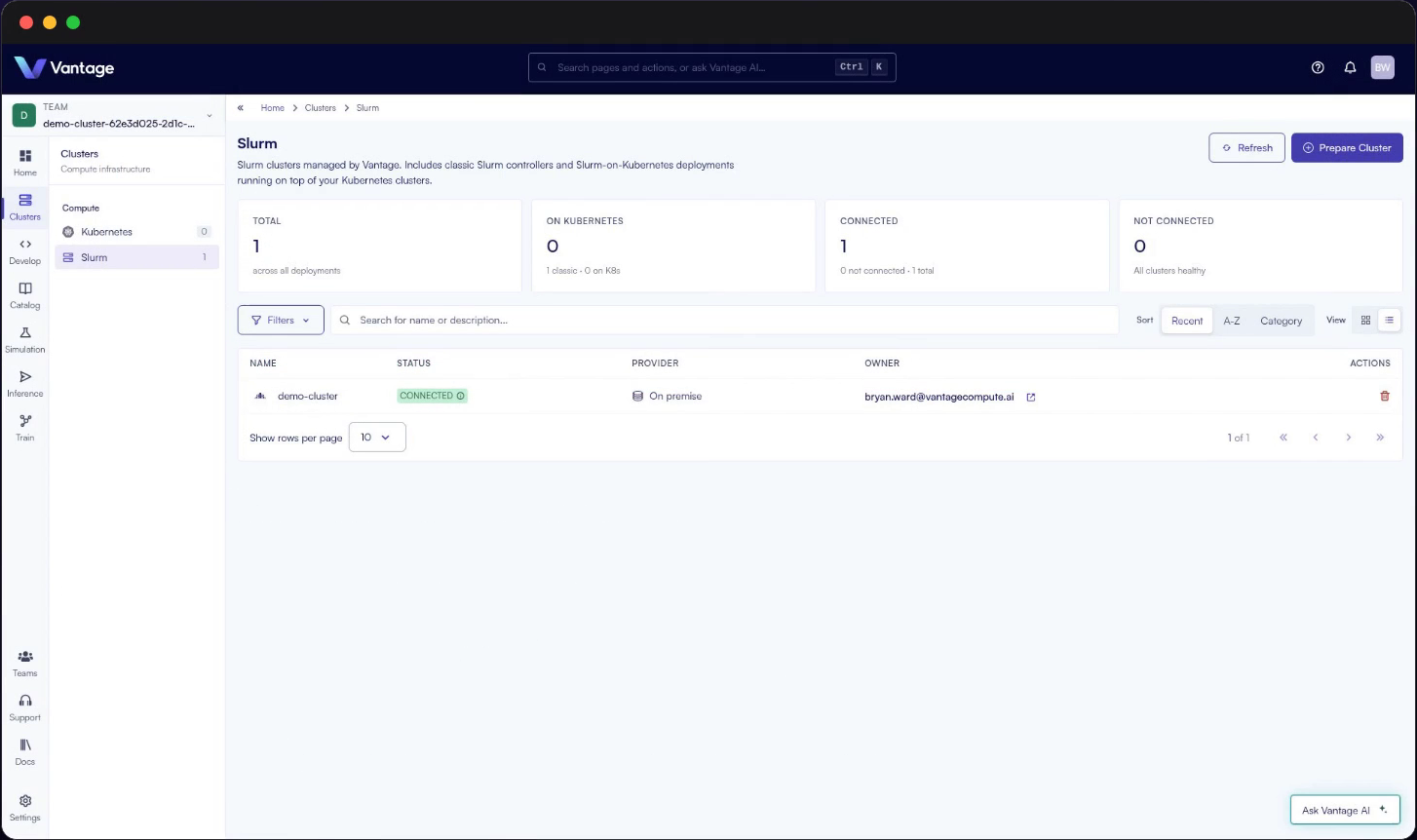
Open demo-cluster to see its partitions, nodes and capacity. It is ready for work.
Step 6: Write a job script
Create a two line job script that prints the name of the node it runs on:
printf '#!/bin/bash\nhostname\n' > hello.sh
Upload it to Vantage as a job script named hello-vantage:
uvx v8x job script create --name hello-vantage --file hello.sh
Step 7: Submit the job
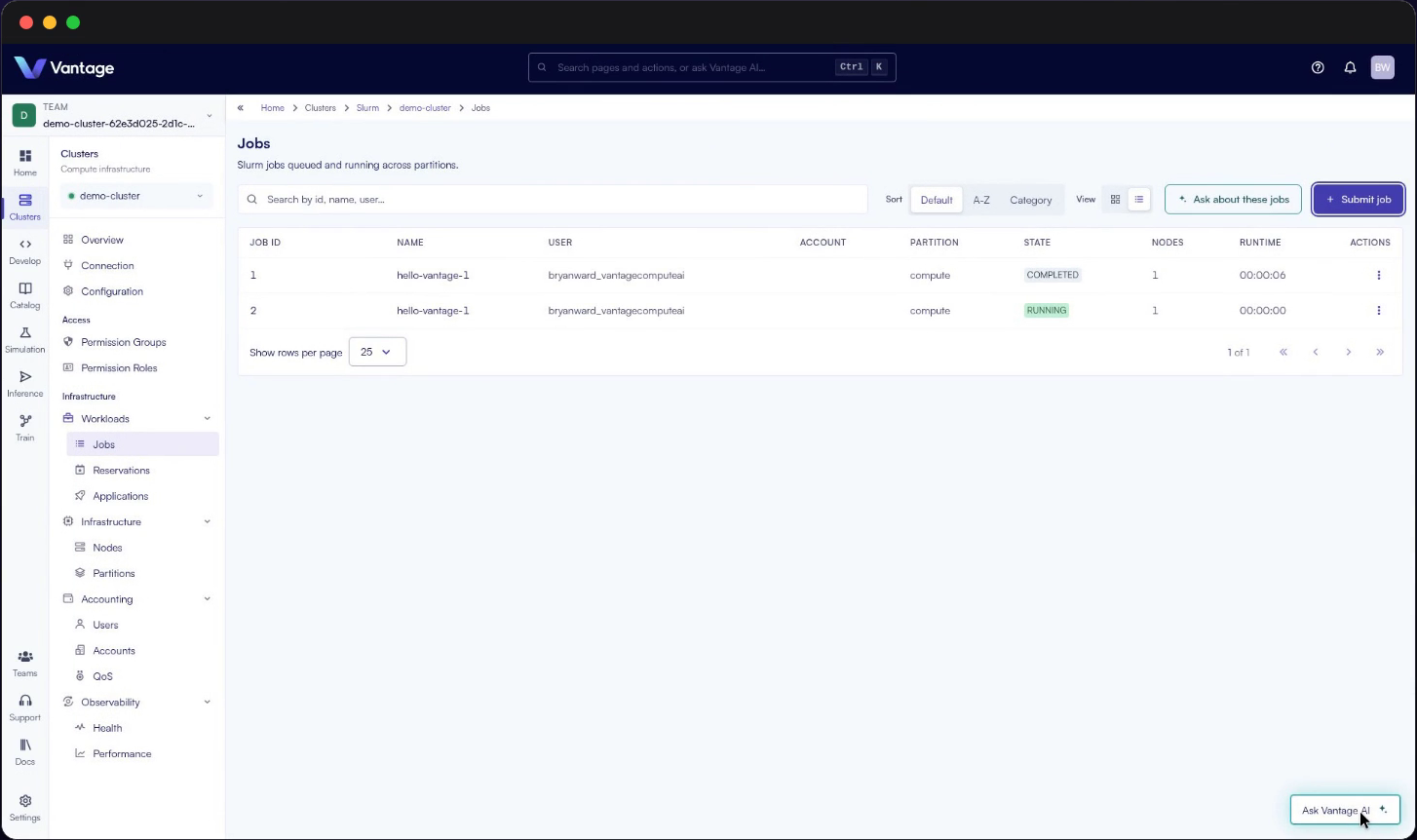
Open demo-cluster in Vantage, then Workloads, then Jobs, and press Submit job. Pick the hello-vantage job script, name the job hello-vantage-1, choose the compute partition and submit. The job is queued, runs and completes.
You can also submit from inside the virtual machine. Log in with the ssh command v8x printed, then run:
export PATH=/opt/slurm/view/bin:$PATH
sbatch hello.sh
Step 8: Look at the job's details
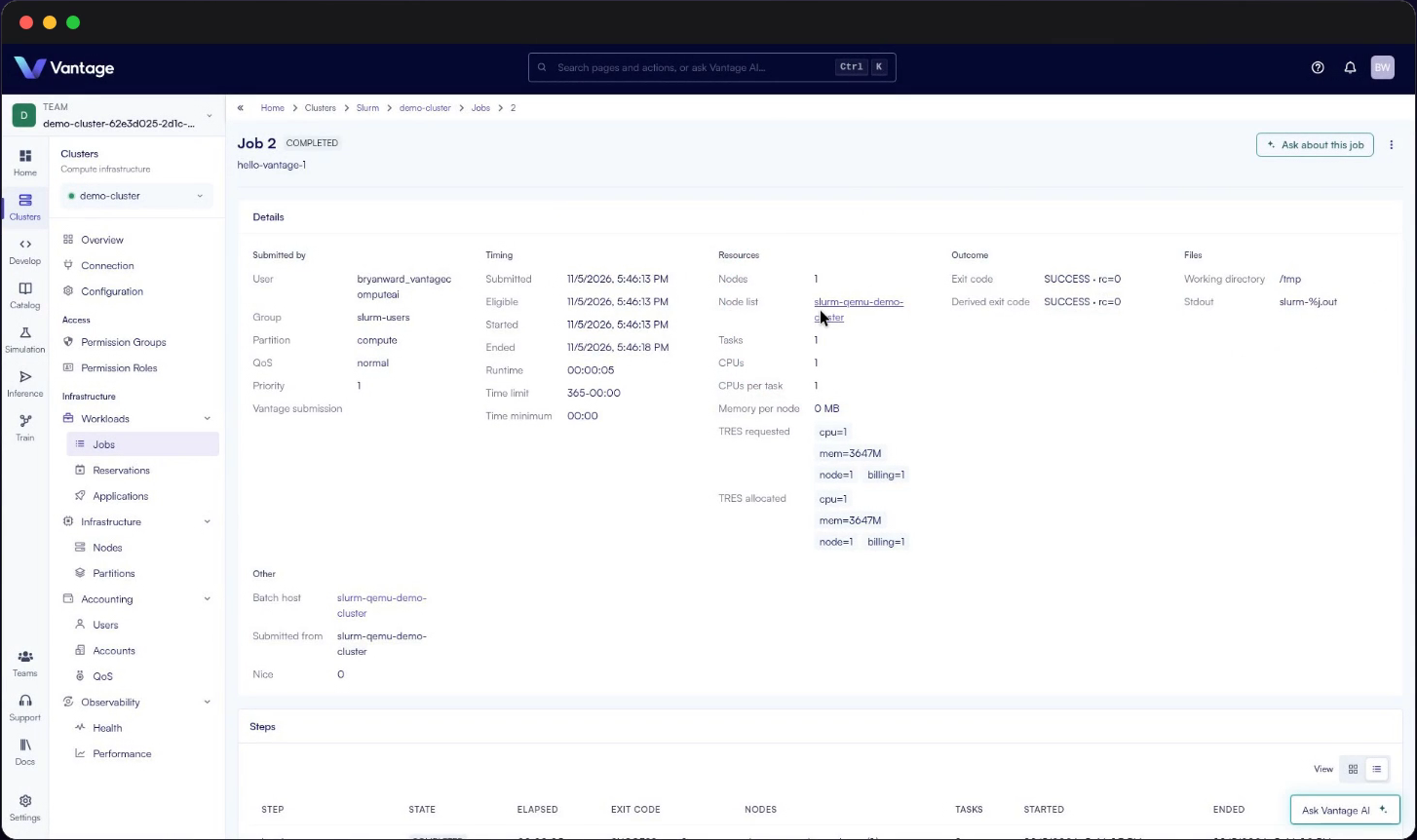
Click the job's ID in the Jobs list. The job page shows who submitted it, when it ran and for how long, the resources it asked for and got, the node it ran on, and its outcome: here, SUCCESS with exit code 0.
The same path enterprises use
The demo is small on purpose. Enterprises already own the hardware: GPU nodes in a data center, a rack in a lab, hosts a team has had for years. We do this for enterprise teams, adding Slurm to that infrastructure, on systems you control, with one place for your engineers to see the cluster and submit jobs. The same Ansible role and Terraform modules are public on GitHub:
The full guide is in the Vantage Compute docs. To see Vantage Compute run on your own infrastructure, book a demo.
Frequently asked questions
What do I need before I start?
A Linux host on x86-64 with hardware virtualization (/dev/kvm), room for a virtual machine with 2 CPUs, 4 GB of memory and 10 GB of disk, uv, and outbound HTTPS to Vantage Compute. If QEMU is missing, v8x prints the commands to install it. It never runs sudo itself.
What does the v8x command create?
A single node Slurm cluster. It registers the cluster in Vantage, downloads a ready-made Slurm image and boots it as a virtual machine under QEMU and KVM. The first run takes a few minutes.
Can I install the agents with Terraform instead of Ansible?
Yes. Add --terraform to the cluster create command. You need terraform 1.4 or newer on the host. v8x boots the virtual machine, then applies the Vantage Terraform modules to it from your host.
Why does this matter for an enterprise?
Enterprises already own hardware. The demo is a small version of what we do for enterprise teams: Slurm on systems you control, with one place in Vantage Compute to see the cluster and submit jobs.
Where can I find the full guide?
In the Vantage Compute docs at docs.vantagecompute.ai.
About the author

Want to run Slurm on your own infrastructure?
Request a Demo